
Click on the People menu to view your contact database.
This is the home page of your contact database.
TABLE OF CONTENTS
- Find a person
- Buyers
- Show Hide columns
- New Contact
- Edit a Contact
- Email a contact
- Send a TXT message
- Add a Task
- Filters button
- Tools toolbar button
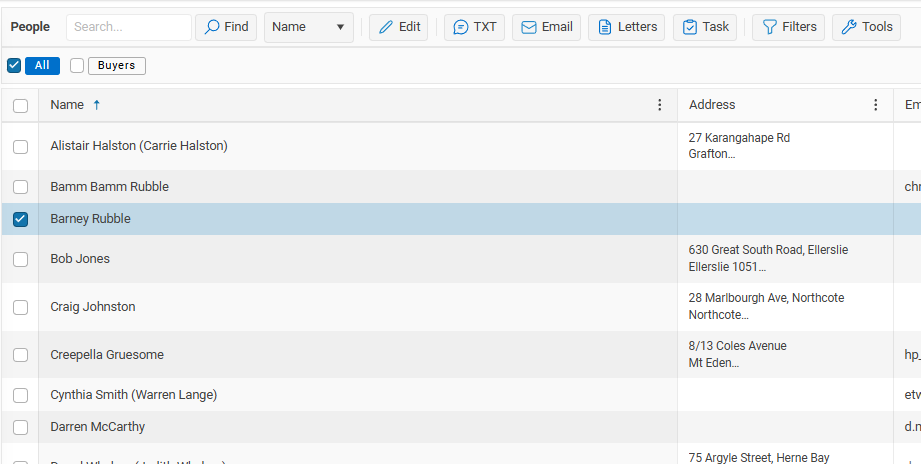
This is where you can Add, Edit, Sort and find a Person in your database.

Find a person

The fastest way to find someone in your database. is to enter their name in the Search box and press enter key or click on the Find button
To search by Email change the Name to Email
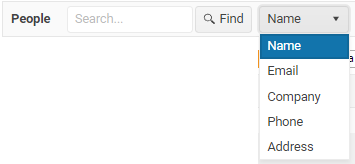
Other options to search by are; Company, Phone or Address
Buyers
Select the Buyers checkbox to view your current Buyers
You can mark a person as a Buyer, all of the other types are set automatically by the program. e.g. A person is a Current Vendor because they are attached to an Available listing
A person can be in multiple groups, e.g. they can be both a current Buyer and a current Vendor
Filters toolbar more...
Show Hide columns
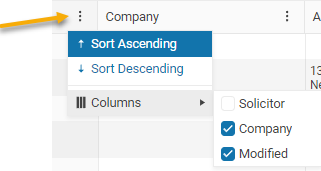
Click on the 3 dots at the top of any column to show or hide additional columns.
New Contact

Click on the + Contact button to add a new person or contact into your database more...
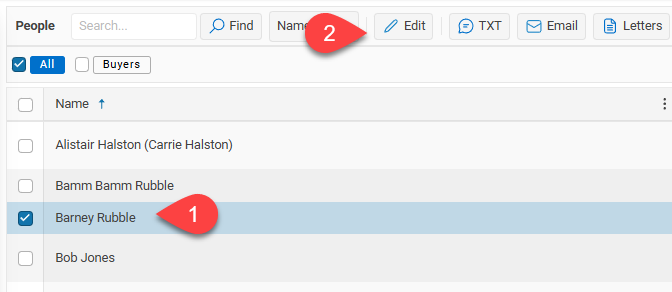
Edit a Contact
Once you have found your Contact
1. mouse over the persons name and click when changes to blue
2. or highlight the row and select the Edit button more...
Email a contact
Sending an Email – Click on the Email button to send an Email more …
Send a TXT message
Sending a TXT message – Click on the Txt button to send a text message to your contacts
Add a Task

Use the Task button to add the same task to multiple contacts.
Filters button

Using the Filter toolbar more...
Tools toolbar button

Manage your People more...